
Case Study
Clock In Where the Team Already Talks!
THE AUTOBIZZ TEAM × AUTOBIZZ
The AutoBizz team already lived in Discord, but hours, missed logouts and leave asks were scattered across channels and a spreadsheet. AutoBizz built a timeclock right inside Discord, with one-click Log In and Log Out, a guided Leave Request and a web board that turns every click into hours an admin can trust.
“Time is the scarcest resource, and unless it is managed nothing else can be managed.”
PETER F. DRUCKER, THE EFFECTIVE EXECUTIVE
Client
The AutoBizz team
Sector
Technology services
Solution
Discord Attendance & Leave
Timeline
Aug - Oct 2026
AutoBizz gave its own team attendance and leave that live right inside Discord.
AutoBizz built a Discord timeclock where every teammate logs in, logs out and requests leave from one five-button panel, backed by Firestore and a Next.js web board for admins. The build ran about 10 weeks, from August to October 2026, and leave requests were working one day after the first commit. Supervisors now approve or reject leave straight from their DMs, and the bot refuses the sessions that would quietly break the hours.
- Discord Interactions
- Node.js
- Express
- Firestore
- Next.js
- Google Cloud Run
The Situation
Everyone was in Discord. The records were not.
AutoBizz is fully remote, so the working day already happened in Discord. Attendance and time off did not. Hours sat in a control spreadsheet and leave was asked for in messages that scrolled away. Nobody had one place to check who was working.
Services We Provided
- Workflow Automation
- Custom Software Development
Old Routine
- 01Post a quick message when the workday starts.
- 02Remember to post again when signing off.
- 03Ask a supervisor for leave in a busy channel.
- 04Wait, and follow up when nobody answers.
- 05Rebuild the month's hours in a spreadsheet by hand.
Each step took seconds. Together they left gaps nobody could see. A forgotten logout or an unanswered leave ask only surfaced when someone sat down to total the hours.
‘The team never stopped showing up for work, but the record of it kept slipping quietly behind.’

The Challenge
Forgetting to log out was easy. Fixing it was not.
One missed click could bend a whole week of hours, and nobody noticed until the totals were wrong.

- Day zeroSomeone closes the laptop without logging out.
- Next morningThe open session runs straight into today's login.
- Days laterA leave ask is still buried in the channel.
- Month endHours are rebuilt from memory and old messages.
- Trust spentNobody can say if the totals match the days actually worked.
System Architecture
The System Design Board
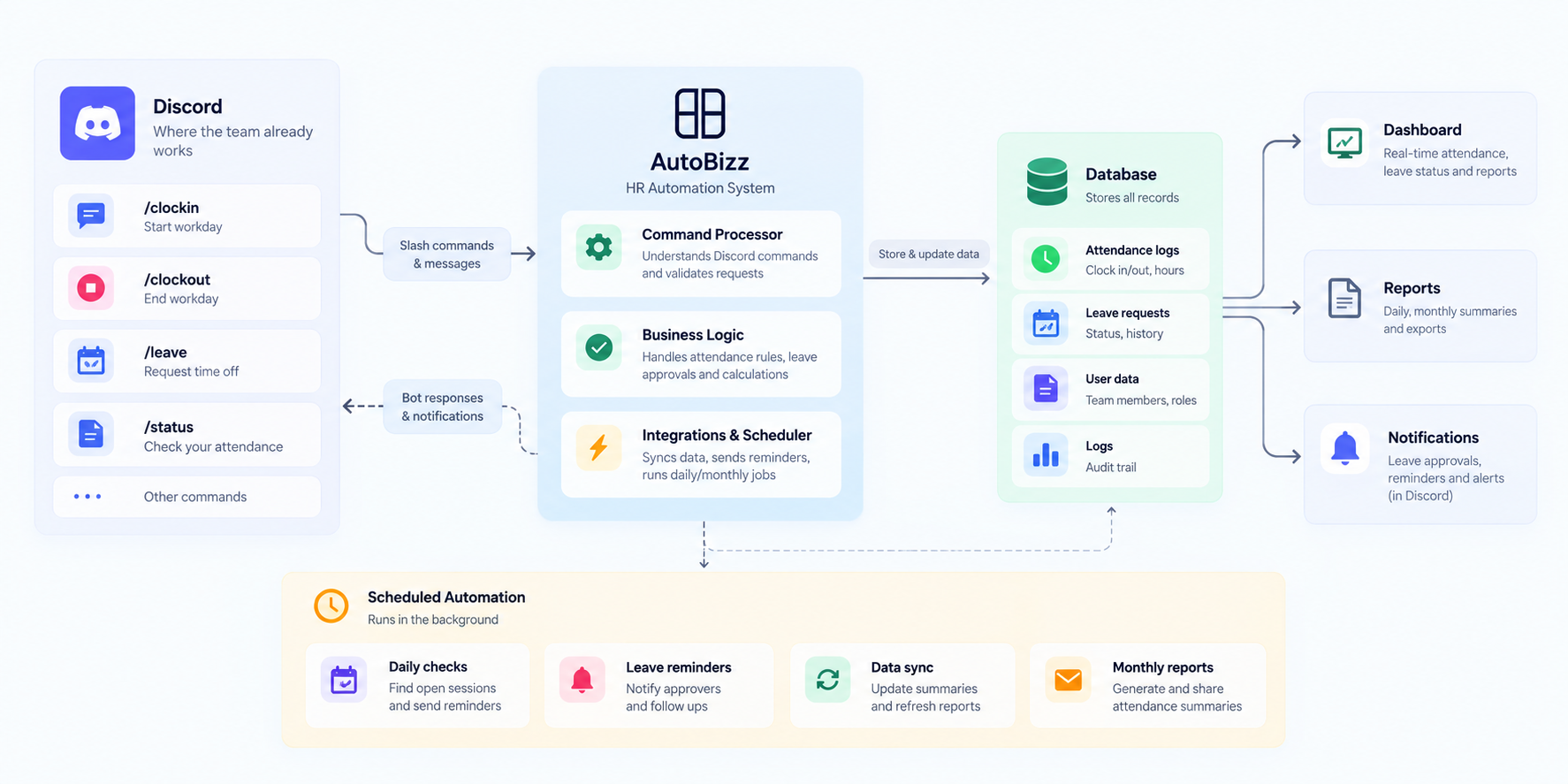



ONE HABIT, ONE SURFACE, ONE PLACE TO CHECK.
CLOCK IN WHERE YOU WORK
The Turning Point
Keep the habit in Discord.
The team did not need another app to remember. AutoBizz kept logging in, logging out and requesting leave inside Discord, where everyone already was, and made the web app the place to read and correct the numbers. Two clock-in surfaces would have meant two places to look when something went wrong.

The Solution
A timeclock built around three clicks
AutoBizz designed every feature around the moments a teammate actually touches: logging in, logging out and asking for time off.
01
The One Click
Instant Log In and Log Out
Green and red buttons record the current time with no form to fill. Every click posts to the timelog channel with the person's server name and avatar.
02
The Honest Clock
Refuses sessions that cannot be real
A logout after a session open for over 20 hours is refused as a missed logout. Overlapping shifts are blocked, so nobody invents hours by accident.
03
The Clear Receipt
Private color-coded replies
Every reply is a private embed whose title states the outcome: green for done, red for refused. Each refusal says why and how to fix it.
04
The Second Chance
Custom time and whole-session entry
Forgot to click? Log a single time or a whole shift from a short form. A logout earlier than the login is read as an overnight shift.
05
The Two-Step Ask
Guided leave request forms
Leave Request opens a Single Day or Date Range choice, then a five-field form with supervisor, dates, half-day options and a reason. Dates can be booked up to 45 days ahead.
06
The DM Desk
Approve and reject from anywhere
Each request lands in the leave channel and in the supervisor's and CC'd teammates' DMs with Approve and Reject buttons. The requester gets a receipt with a Withdraw button until someone decides.
07
The Gentle Nudge
Late reminder DMs
Anyone on fixed hours who has not logged in 15 minutes after their start gets one private reminder. People on leave or on their weekend are never pinged.
What Changed
From scattered messages to one clear record
Before
Now
Before
Logins posted as loose chat messages
Now
One click records the exact time
Before
Missed logouts found at month end
Now
Stale sessions are refused on the spot
Before
Leave asks buried in busy channels
Now
Requests reach supervisors' DMs with buttons
Before
Hours rebuilt by hand in a spreadsheet
Now
Admins read the same live hours on the web

The Results
Five weeks in, the hours track themselves
1,756
Hours tracked
Every hour in the first five weeks came from a click, not a spreadsheet.
99%
Logged in Discord (Rest from Web)
393 of 395 shifts were recorded straight from the Discord panel.
22 min
Median leave decision
Half of the 16 leave requests were approved or rejected within 22 minutes.
17
Late reminders sent
Each one reached its teammate without a supervisor having to chase.
Recent Case Studies



References
Documentation this build relies on
- 01
Discord Interactions: Receiving and Responding
How the bot receives every click and form submission over HTTP.
discord.com - 02
Discord Component Reference
The buttons, select menus and modals behind the panel and leave forms.
discord.com - 03
Firestore with MongoDB Compatibility
The database that stores every shift, leave request and teammate record.
cloud.google.com - 04

Get Started
Still totaling team hours from chat messages?
If your team already works in Discord or Slack, the timeclock can live there too. AutoBizz can turn logins, logouts and leave requests into one record your admins can trust.
Frequently asked questions
Still have questions? Book a call and we'll answer anything.
What is a Discord attendance bot?
How do team members log in and log out?
What happens if someone forgets to log out?
How does a leave request work in Discord?
Can this work with an office fingerprint or card attendance machine?
Can the same system run on Slack, Microsoft Teams or another app?